
Docs
Settings guide
Find non-IM settings, understand each field and its application scope.
This guide covers non-IM settings in public deepseekbot@0.1.0-alpha.1 on DSH 0.2.0-rc.1: where to open them, what each field does, and when changes apply. Complete installation and API / Bot model setup first. Slack and Lark account/connection fields remain in their connection guides. Screenshots show the verified Chinese UI.
Find the right settings page
| Setting | Location |
|---|---|
| DSH appearance, language, default permissions, input behavior | Bottom-left Settings → General settings. |
| API providers and model catalogs | Settings → Models; see Model setup. |
| Native Agent tools and working style | Settings → Agent presets. |
| Bot icon, motion, sorting, concurrency, your name | Bot settings beside Bot mode, or Settings → Bot settings. |
| One Bot's name, avatar, models, attention | Its DM header name/avatar → View details. |
| Right sidebar layout and session views | Gear at the top of Channel sidebar. |
| One Bot's work folders and task permissions | Workspace grants in the right sidebar. |
| An existing DSH Session's model and permissions | Open it from Sessions in the right sidebar and inspect its native controls. |
DSH general settings
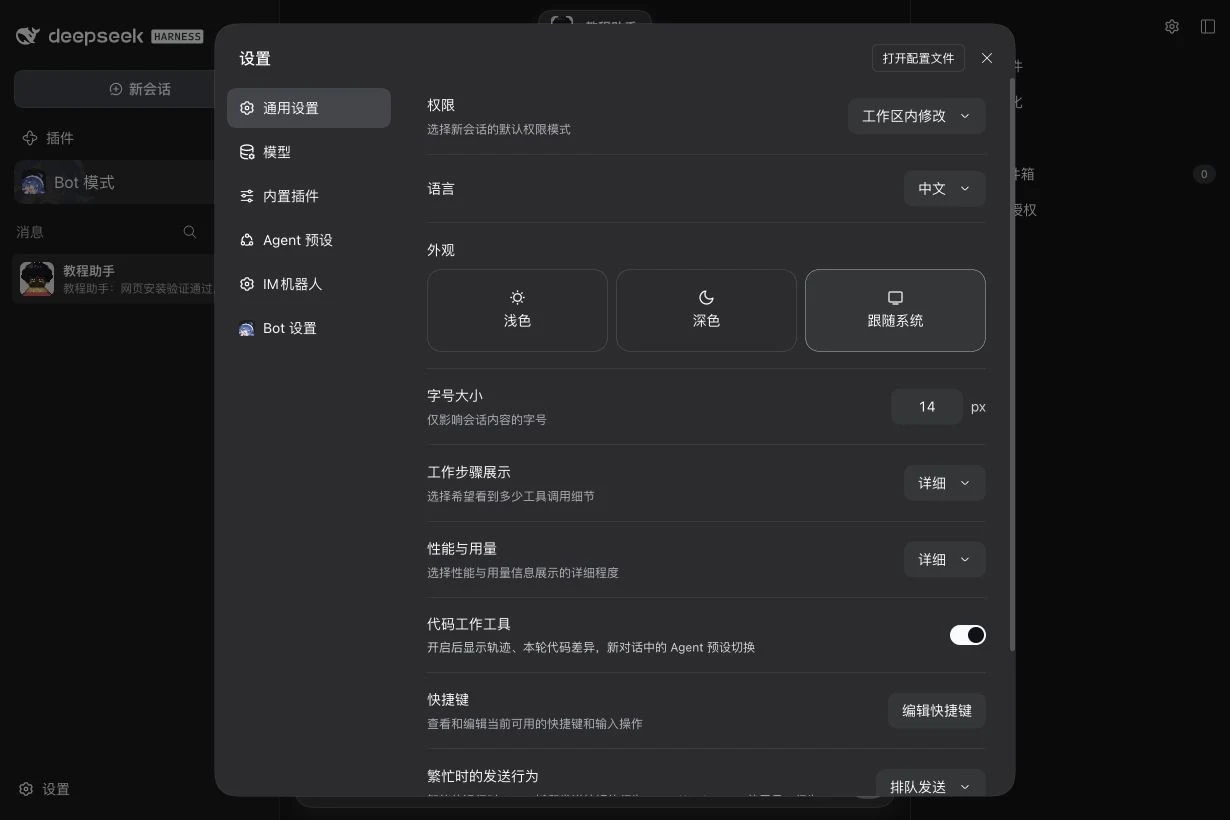
These are native DSH settings. Initial values below were observed in a clean RC1 Profile; existing Profiles may retain different choices. Selectors and switches save directly. Fields with a Save button require that button.
| Field | Options / initial value | Purpose and scope |
|---|---|---|
| Permissions | Read-only / workspace write / full access; initially workspace write | Default for new native sessions. Bot task permissions are configured separately under Workspace grants; this label does not prove an existing task's permissions. |
| Language | Chinese or English; screenshots use Chinese | Interface language. |
| Appearance | Light / dark / system; initially system | Interface theme. |
| Font size | Initially 14 px; increase/decrease buttons | Conversation content font only. |
| Working steps | Concise / standard / detailed / fully expanded; initially detailed | How much tool-call detail is shown; does not grant tool permissions. |
| Performance and usage | Concise / detailed; initially detailed | Detail level for performance and token information. |
| Code working tools | On/off; initially on | Shows traces, current-turn code changes, and Agent preset switching in new conversations. |
| Keyboard shortcuts | Edit shortcuts | View and edit bindings; follow conflict hints, save, or restore defaults. |
| Send behavior while busy | Initially queue; can select steer | Enter / Send behavior while an Agent runs. Cmd/Ctrl+Enter uses the alternative. Separate from a Bot's source attention policy. |
| Upload Session Log when using the official model API | On/off; native initial value was on | Whether session logs are uploaded through the official API to improve models and products; choose your preference. |
| Open configuration file | Button | Native entry to the current Profile configuration. Use the relevant forms for everyday changes. |
Agent presets and built-in plugins
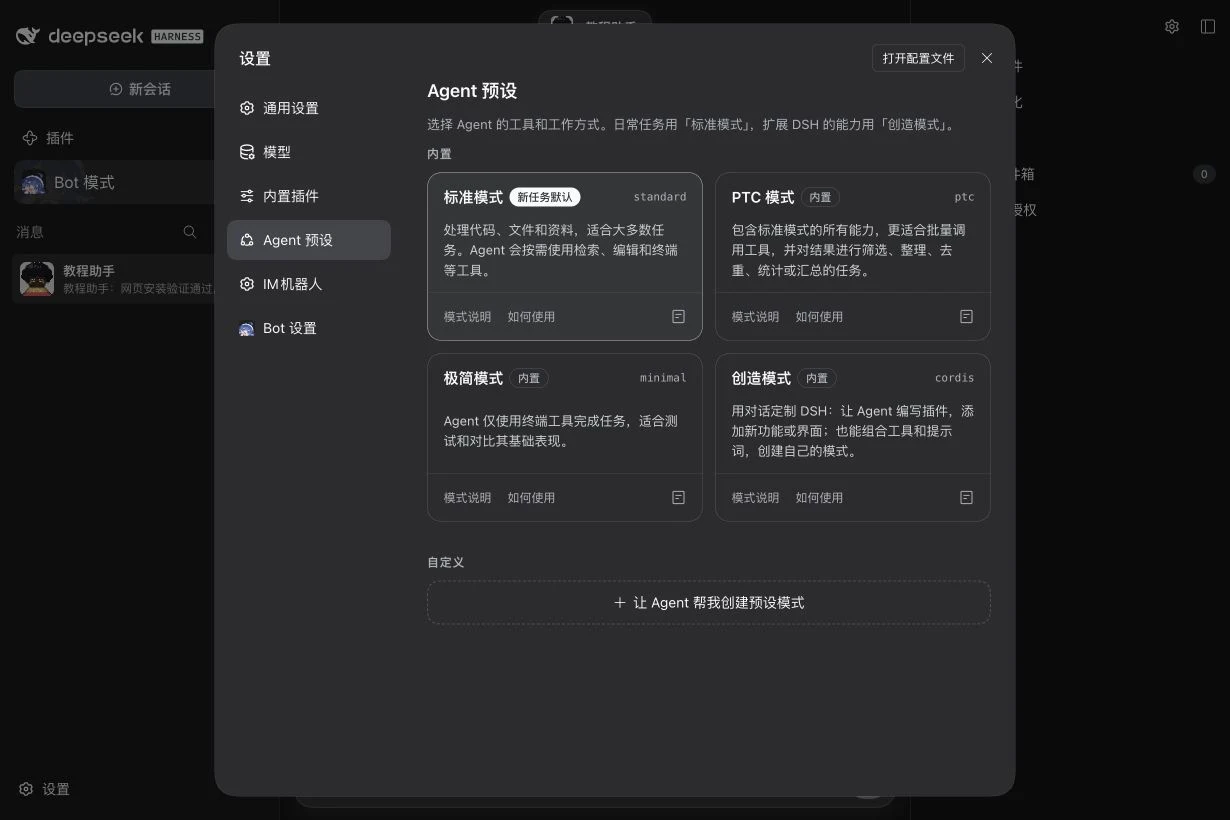
Agent presets select native tools and working style. “Set as default for new tasks” applies to subsequent native tasks. Review each preset's configuration, description, and usage instructions first. These are separate from Bot model presets.
| Preset | Use |
|---|---|
| Standard (initial default) | Most code, file, and research tasks. |
| PTC | Batch tool calls and filtering, deduplicating, counting, or summarizing results. |
| Minimal | Terminal-based tasks; baseline testing and comparison. |
| Creation / Cordis | Write DSH plugins and compose tools/prompts to extend DSH. |
| Custom | Use “Let an Agent help me create a preset”; inspect its configuration and instructions afterward. |
Built-in plugins supports search, Session/Global plugin groups, selection of the Agent preset to inspect, and plugin status/details. Third-party fields depend on each installed plugin and are not all required DeepSeekBot settings. Install/enable packages using Installation. Advanced deployment layers and BotHarness configuration keys are linked at the end of this page.
Global Bot settings
| Field | Default / options | Save and effect |
|---|---|---|
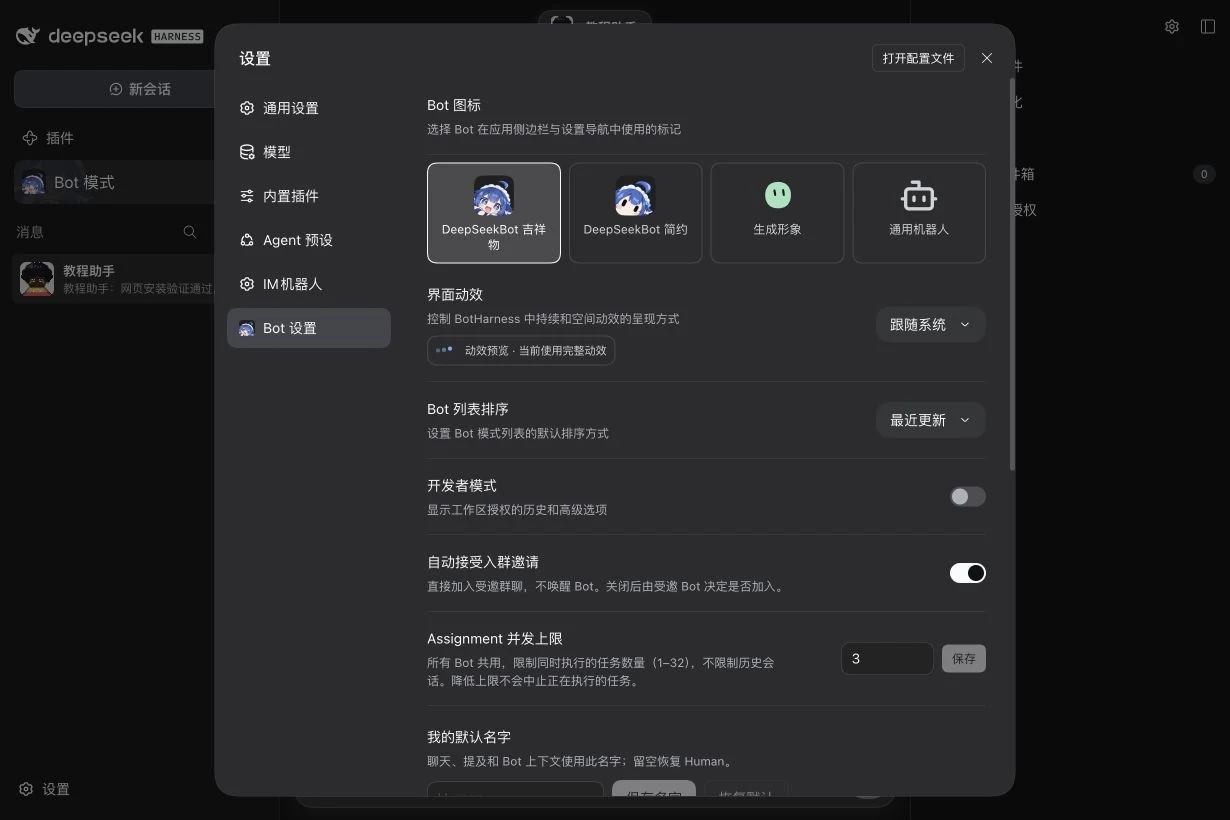
| Bot icon | DeepSeekBot mascot; simple, generated, or generic robot | Click to save. Changes the app/sidebar settings marker, not each Bot's avatar. |
| Motion | System; reduced or full | Selection saves immediately. The preview reports effective motion. |
| Bot list sorting | Recently updated; manual | Default sorting; drag rows for manual order. Pinned areas/sections may have their own sort choice. |
| Developer mode | Off | Shows workspace grant history and advanced options; grants no file access. |
| Auto-accept Group invitations | On | Join invited BotHarness Groups without waking the Bot. When off, the invited Bot decides. Does not configure an IM connection. |
| Assignment concurrency limit | 3; integer 1–32 | Enter and Save. Shared across Bots; limits executing tasks, not historical sessions. Lowering it does not stop running tasks. |
| My default name | Empty → Human; maximum 128 characters | Save name for chat, mentions, and Bot context. Restore default or save empty to return to Human. |
The lower “External platform defaults” area belongs to IM intake/identity settings; see Lark / Feishu and Slack.
Create a Bot and edit its Profile
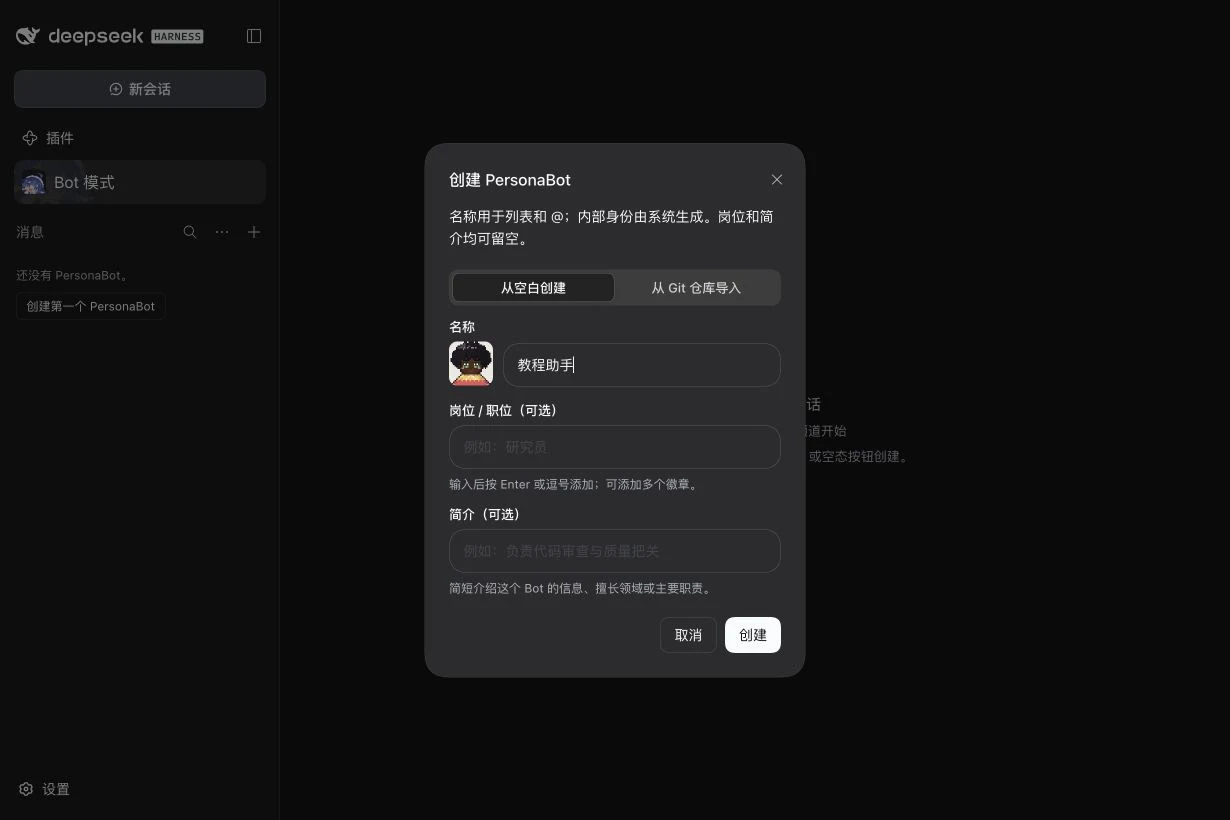
Use “Create your first PersonaBot” in Bot mode or the list's New menu.
| Field | Configuration |
|---|---|
| Source | Empty creates a new Memory Repository. Git import takes an accessible Git URL and uses that repository rather than showing blank-persona templates. |
| Name | Required display name; rename later using the edit button beside the Profile name. |
| Roles | Optional badges; Enter/comma confirms a badge and its close button removes it. Badges do not grant capabilities. |
| About | Optional short introduction shown in the Profile. |
| Persona template | Blank / colleague / roleplay seed for the creation text. |
| Persona | Editable identity and communication instructions at creation; not model, API, or permission configuration. |
After creation, open View details:
- Change avatar: choose PNG, JPEG, or WebP; adjust the crop and save. An uploaded avatar can be removed.
- Design avatar: choose illustrated/line style, presets, parts, shape sliders, and colors. Save applies the preview; cancel discards the draft. An uploaded image takes display precedence.
- Activity overview: pins select cards in the Profile popover. Token usage time range, model/provider grouping, filters, and custom dates change the statistics view, not the model. Unavailable usage is unknown rather than zero.
- Model preset: see Model setup for every field, template revision, and independent snapshot.
- Persona / memory files: use Memory files in the right sidebar to inspect files and their available edit/preview actions. The Profile does not repeat every creation field as an editing form.
Bot attention policy and local Groups
Expand Attention policy in the Profile. Edit the relevant source row and Save; Restore default removes its override. Read-only rows expose details, revision, actor, and recent wake counts.
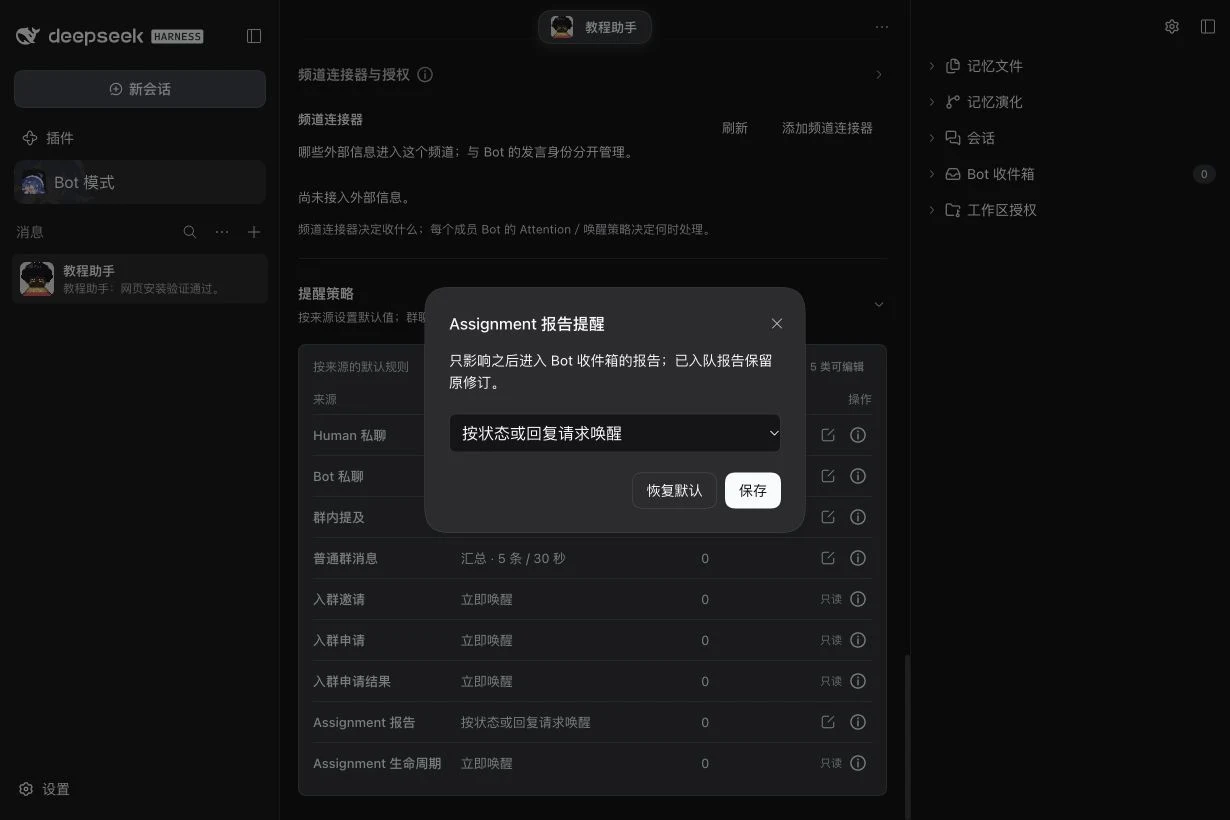
| Source / field | Options and effect |
|---|---|
| Human DM, Bot DM, Group mention | Immediate wake; choose “Fold into the running turn” (default) or “Queue as its own turn” for arrival during an active turn. |
| Ordinary Group messages | Immediate / digest / direct mentions / silent recording. Initial digest: 5 messages / 30 seconds. Count integer 1–100; interval integer 1–3600 seconds. |
| Assignment reports | Default wake by state/reply request, or wake on every report. Applies to reports entering the Inbox afterward; already queued reports retain their revision. |
| Group invitations, join requests/decisions, Assignment lifecycle | Read-only in this table; Details is not an edit action. |
Local Groups allow an ordinary-message override for each Bot under Group header → View details. Inherit uses that Bot's default; edits/restoring inheritance are scoped to that Group. Group member controls manage invitations, join requests, and membership. These policies do not change API providers, models, or workspace permissions.
Channel sidebar display settings
The Channel sidebar chapter provides step-by-step feature guides; see Display and layout for ordering, visibility and save/cancel behavior.
Open the right sidebar's gear menu. These browser display preferences do not change durable Bot memory or task authorization.
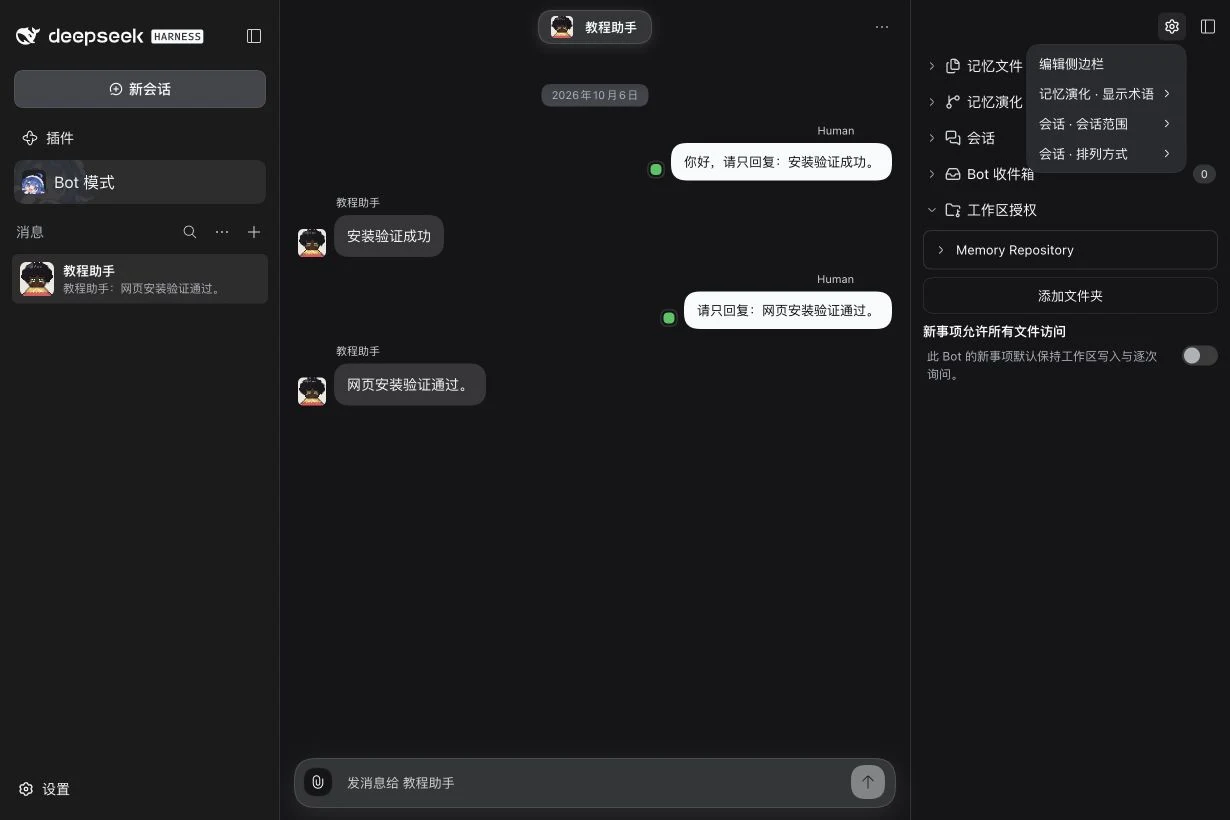
| Field | Default / effect |
|---|---|
| Edit sidebar | Drag entries into order, select visible entries, then finish. Bot DMs and Groups can use different layouts. |
| Memory evolution → Terminology | Memory terms by default; Git terms rename the same underlying commit view. |
| Sessions → Scope | Current by default; All expands the filter for that Bot's session view. |
| Sessions → Layout | Flat by default; optionally group by workspace. |
| Sidebar width | 320 px by default; drag the divider within 260–560 px. Sidebar/entry expanded states are retained too. |
Workspace grants and task permissions
Expand Workspace grants for the target Bot. Memory Repository is its memory directory. Use Add folder to choose extra task folders on the DSH Host; a remote browser does not substitute its own local paths.
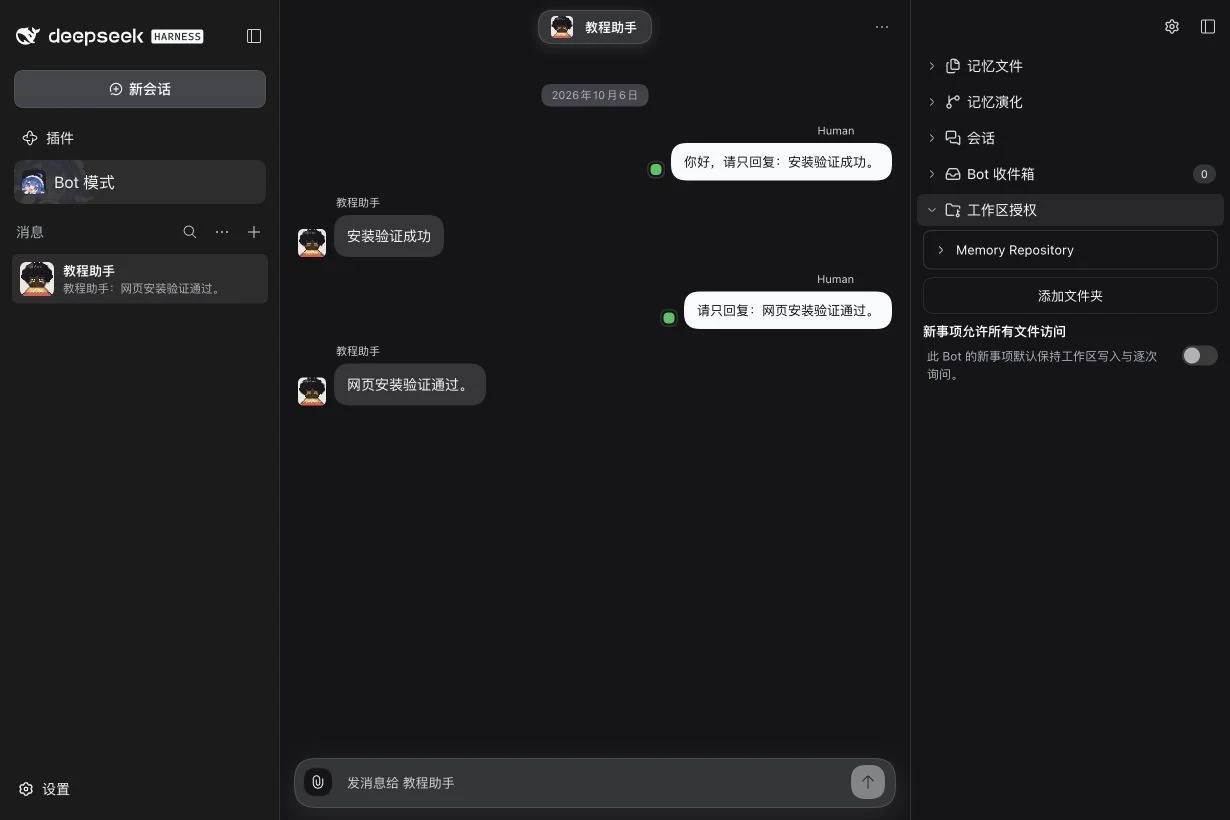
| Field / action | Effect and scope |
|---|---|
| Add folder | Choose and confirm a task directory this Bot may use. Grants are managed separately for each Bot. |
| Revoke/remove directory | Revoke its authorization for subsequent work; does not delete the directory's files. |
| Allow all file access for new work | Off by default: new Assignments use workspace write and ask for approvals. Enabling requires explicit confirmation and applies full file access to new tasks, not existing permission snapshots. |
| Tool approval rules | The actual prompt offers one-time approval, remembered exact operations, or broader rules. Inspect Bot, role, directory, and operation scope before confirming. Existing rules can be inspected and revoked. |
| Developer-mode history/advanced options | Inspect revoked grants and history. Showing them does not restore authorization. |
For a first task, choose one specific directory, retain default permissions, and verify an actual task. Model choice, directory authorization, and task permissions are separate settings.
Advanced parameters and optional capabilities
Public alpha.1 composes Core, Client, and the qualified IM Provider. Browser/Computer development capabilities do not become available merely by following the npm installation steps. The generated Core configuration reference covers enabled, agentPreset (session tool preset, default standard), and activityDetailConsumers (trusted Host plugins allowed to read activity details, initially empty). Optional Browser target, driver, path, headless, and idle-stop fields are defined in Browser configuration; Computer target, desktop resources, export directory, and action authorization fields are defined in Computer configuration. Existing operational guides cover daily browser sharing and Computer export/transfer.
Check the installed version, then inspect the relevant plugin under Settings → Built-in plugins for its details/parameters. Deployment fields without a form are configured through Profile/Patch layers as described by the official DSH documentation. The website's development reference can be newer than npm alpha.1; optional capabilities there are not a claim about what this package includes.