
Docs
Memory files
Browse a Bot’s current Memory files and inspect their contents.
Open a Bot DM → Channel sidebar → Memory files. The tree belongs to this PersonaBot’s Memory Repository, not the folder used by an Assignment. A new Bot can have only initialization files; useful topic files appear as you or the Bot save them.
Read a file
- Expand Memory files and any folder containing the file.
- Click a filename. Its current contents open in the center, temporarily replacing the chat history and composer.
- Use Refresh in the file view to fetch its latest contents.
- Click Back to chat to return to the same conversation.
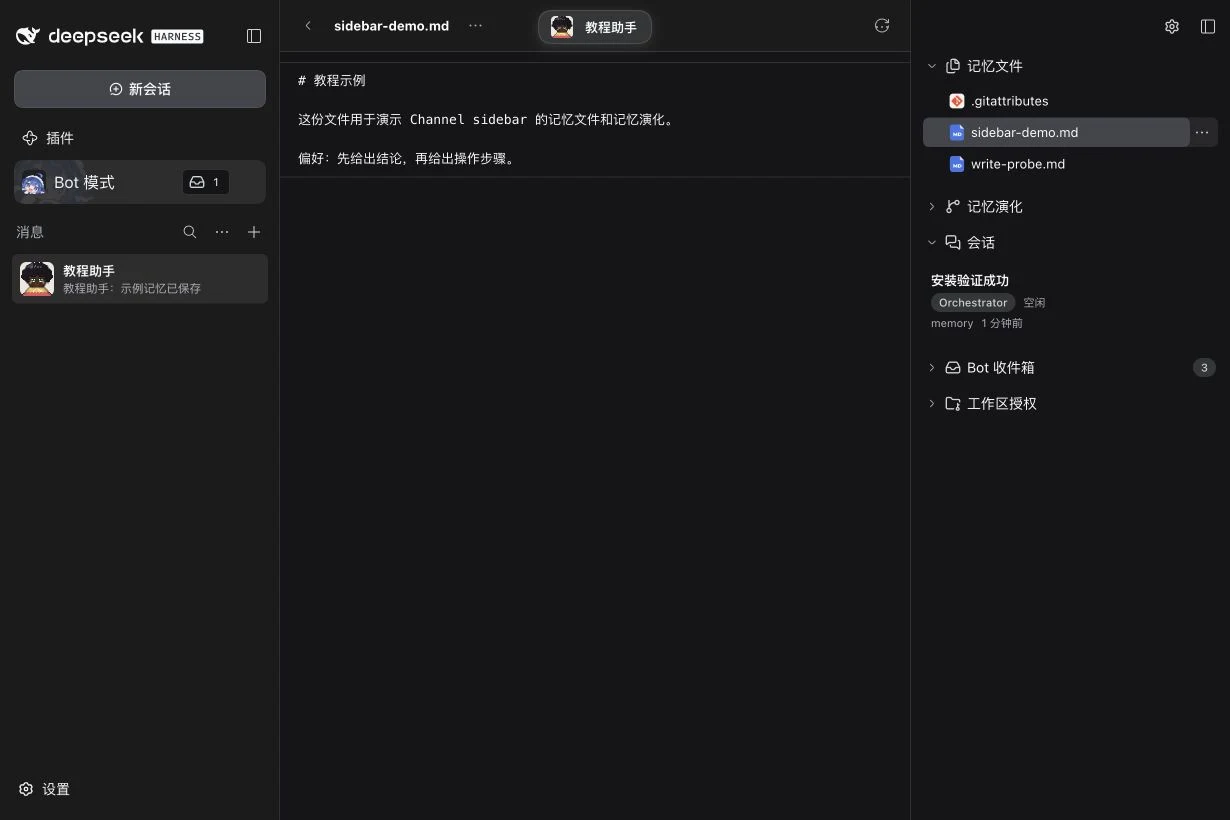
The preview is a reader. To change a file, ask the Bot to update it, or use an editor on the Host. For example: “Save my preference in replies.md: start with the conclusion, then give the steps.” Confirm the result by opening the actual file. Topic filenames and folders are your convention; the repository can also contain code and binary files.
File actions
Use the row’s …, its context menu, or the file view’s action control. Depending on the Host, the menu offers opening in a native application, showing the file’s location, downloading to the current device, or copying its Host path. Folder actions do not download a folder as a file. See Open files on the Host for availability and the distinction between the Host and your browser device.
Current files and history
This tree shows the current checked-out working tree, including uncommitted content. A Git commit is not an extra acceptance gate for a file to become Memory. Use Memory evolution to inspect changes and history separately.
| What you see | Next action |
|---|---|
| No Memory files | Ask the Bot to save a useful topic file, then reopen or refresh the view. |
| File no longer exists | Refresh the tree and select a current path. |
| Binary or oversized file | The reader does not provide a text preview; use file actions or ask the Bot to inspect it with its tools. |
| Loading or update failure | Check the displayed error and use Retry; a previous preview may remain visible while the update fails. |
Next: Memory evolution. All sidebar features.